
Keep your notes safe
Start over when both are lost
Lost your passphrase and your recovery key? Nothing encrypted can be recovered, but your email address can start again with a new, empty account.
This is only for when your passphrase and your recovery key are both gone for good. If you still have the recovery key, use Forgot your passphrase instead: it keeps everything.
Nothing encrypted under your old keys can be decrypted again, by you or by us. What you can have back is your email address, with a new, empty account and new keys. The notes already in your vault are ordinary files and are not touched.
Before you start
- A vault signed in to Nectenda. If yours is signed out, sign in as usual, and close the passphrase prompt when it appears. The vault stays signed in, with its folders locked.
- The email address you sign in with.
- If you pay for an organisation that you are the only owner of, cancel its subscription first with Manage subscription (see Upgrade). That organisation stays with your old account, and your new account cannot open it.
- Tell the people you share folders with. They will be asked to compare your new key.
Steps
- Open Settings and choose Nectenda.
- Open the Security page (under More). In Encryption, below Your folders are locked, find "Lost both the passphrase and the recovery key?" and choose Start over.
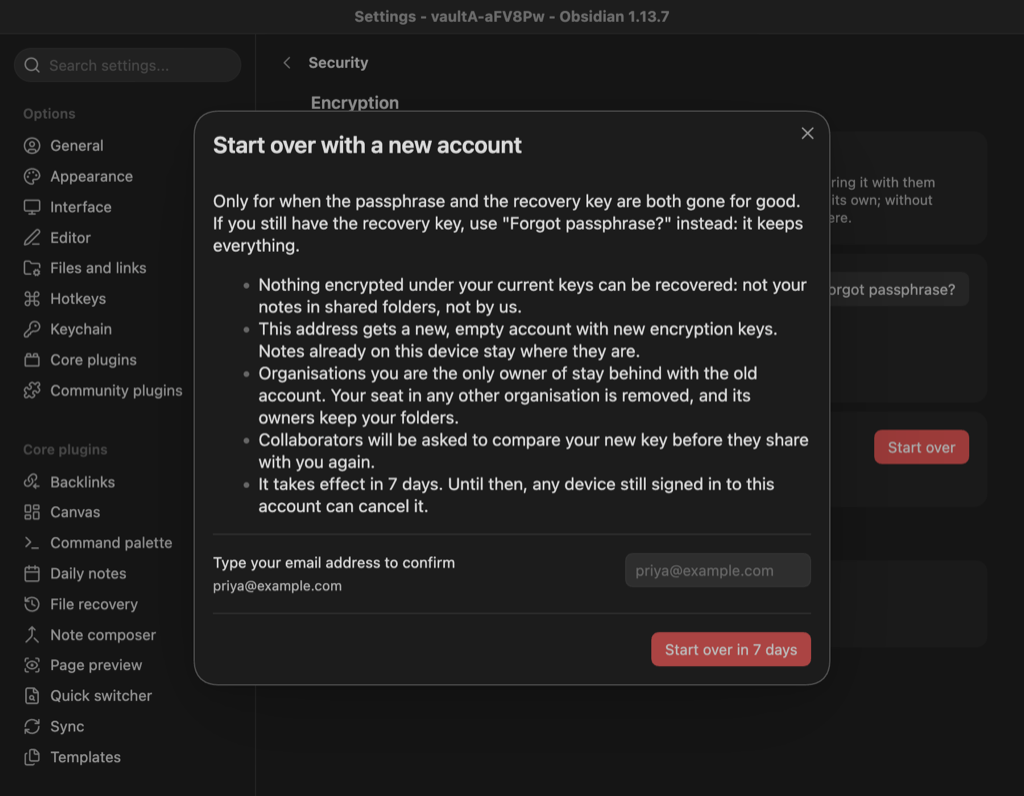
- Read the list in Start over with a new account. It says what you lose and what stays.
- Type your email address in the box.
- Choose Start over in 7 days.
Check the result
A notice gives the date it will happen, and an email confirms the request. Every vault signed in to your account shows This account will start over on …, once as a notice and at the top of Nectenda's settings, with Cancel reset beside it. A vault that was already open finds out when Obsidian next starts, or straight away if you choose Refresh beside Shared with you in Nectenda's settings.
Nothing changes for 7 days. Then:
- Every device is signed out, and an email says the address is free.
- Sign in again. You get a new account: choose a new passphrase and save the new recovery key.
- In an organisation that has another owner or admin, your old seat is removed and they keep the folders. An owner invites you again to bring you back.
- An organisation you were the only owner of stays behind with the old account, as it was.
- When they share a folder with you again, collaborators see KEY CHANGED beside your name. They compare your new key with you before sharing: see Compare encryption keys.
Troubleshooting
I changed my mind
Choose Cancel reset in Nectenda's settings on any vault still signed in, before the 7 days are up. Nothing has changed, and an email confirms it.
I did not ask for this
Someone who can read your email may have. Choose Cancel reset on any signed-in vault now, then change your email password. The 7-day wait is there so that you can do this. If a signed-in vault does not show Cancel reset, choose Refresh beside Shared with you in Nectenda's settings, or restart Obsidian.
I do not see Start over
It shows only while your folders are locked. On a device that cannot keep your key between sessions, the vault never shows as locked, so the button does not appear. Contact us from the email address you sign in with, and we can make the same request for you, with the same 7-day wait.
I found my recovery key after starting over
Contact us. The old account was kept, so we can restore it. The newer account is closed in its place, and anything you set up in it stays with it. Then sign in and use Forgot passphrase? with the recovery key. Organisations you owned alone come back as they were. A seat that was removed does not: an owner of that organisation invites you again. Collaborators see KEY CHANGED again, this time back to your old key.