
Share and collaborate
Join by invitation or link
Accept an invitation to someone's organisation in Obsidian, from Shared with you in Nectenda's settings or by opening the link in the email.
An invitation brings you into someone's organisation, and, if it was to a folder, into that folder too.
Before you start
- Install the plugin.
- The email address the invitation was sent to. Sign in with that one, or the invitation will not be listed for you.
Steps
- Sign in with the invited address. If you are new, you choose a passphrase as part of this.
- Open Settings, choose Nectenda, and find Shared with you.
- Choose Accept beside the invitation. If you have not set a passphrase yet, you are asked to now.
Or open the link in the invitation email on a device where Obsidian is installed and signed in. It accepts the invitation for you and opens the Nectenda settings.
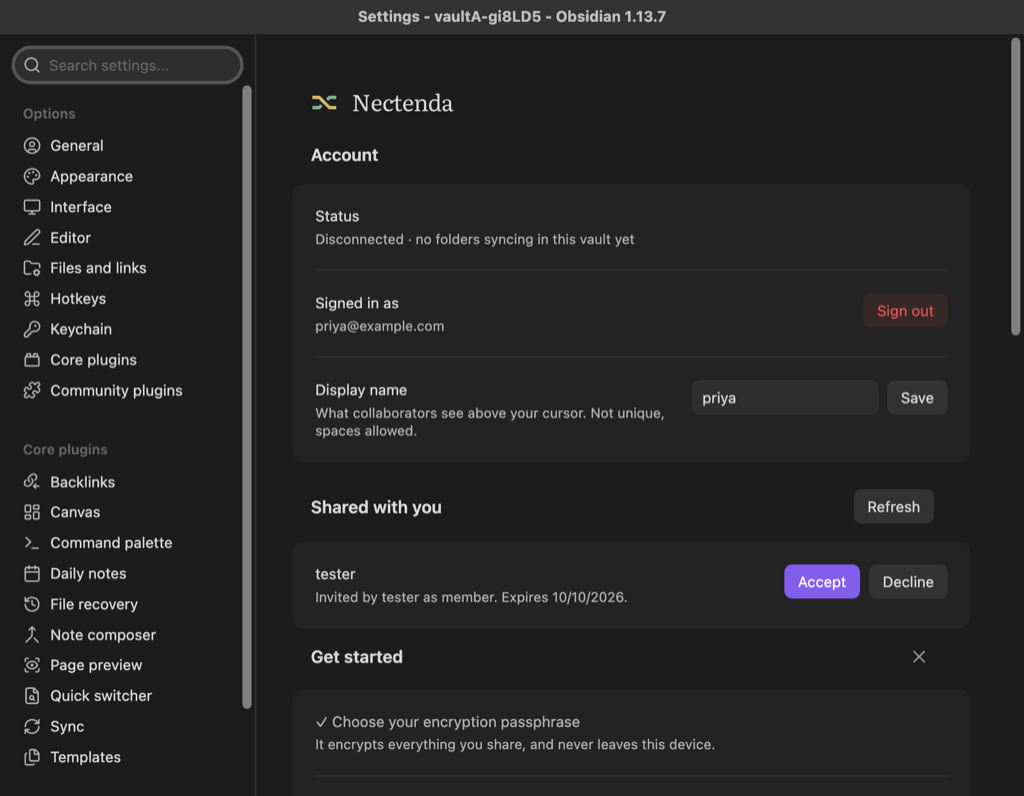
Check the result
A notice says You have joined and the organisation's name, and it appears under Organisations. If you were invited to a folder, Nectenda offers it to you once its key arrives: see Add a shared folder to this vault.
Troubleshooting
There is no invitation in the list
Check you signed in with the address it was sent to, then choose Refresh beside Shared with you. Invitations expire after 14 days; ask for a new one if yours has.
The link says to sign in first
Sign in, then open the link again — or accept it under Shared with you, where it is waiting.
I was given a link, not an email
That is a share link to an organisation. See Share links.
I do not want to join
Choose Decline. Nothing else happens.