
Manage access
People and roles
Who can do what in a shared folder and in an organisation, where to see everyone, and why Nectenda has no read-only role.
There are two kinds of membership: of an organisation, which is who you share with and who is billed, and of a folder, which is who can open it. A folder belongs to one organisation, and only people in that organisation can be in it.
Folder roles
| Role | Can edit notes | Can invite and remove people | Can stop sharing the folder |
|---|---|---|---|
| Owner | Yes | Yes | Yes |
| Editor | Yes | No | No |
Whoever shares a folder is its first owner. A folder can have several owners.
See everyone in a folder
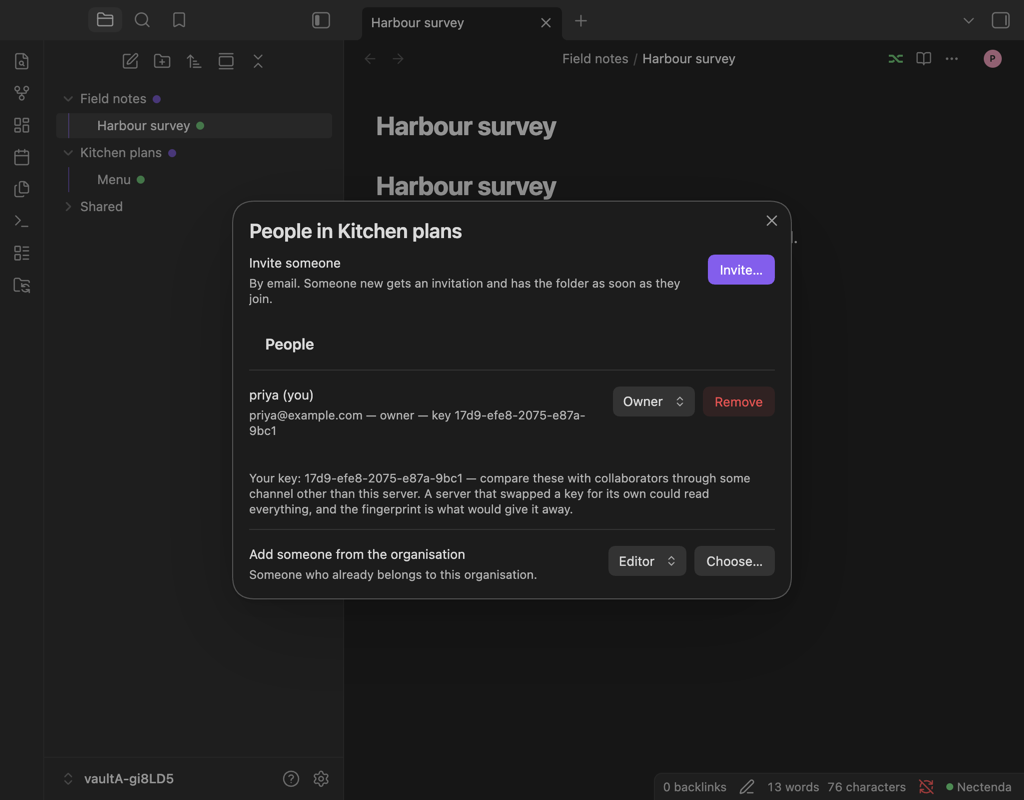
Right-click the shared folder and choose Nectenda: People…, or run Nectenda: Show the people in a shared folder… from the command palette. You can also open Settings → Nectenda, choose the folder under This vault, and choose People… under People. The People in … dialog lists everyone, each with their role, their key fingerprint and whether you have compared it. Your own line is marked (you).
These are there for the folder's owners. An editor who opens the folder's page sees a note that only owners can invite or remove people.
From there an owner can:
- Invite… someone by email. See Invite someone to a folder.
- Change someone's role with the dropdown beside their name.
- Remove someone. See Remove someone or stop sharing.
- Add someone already in the organisation, under Add someone from the organisation, with Choose….
Invitations nobody has accepted yet are listed under Invited, with Revoke beside each.
Organisation roles
Organisations have owners, admins and members. Owners and admins can invite new people and remove members; only an owner can change the plan or another person's role. Everyone in an organisation takes one seat on its plan. The list is on your organisation's page in the Nectenda settings, under People in the Plan, storage and devices section.
Why there is no read-only role
Everyone in a folder holds its key, and anyone holding the key can write a change the other vaults will accept. The server cannot tell a permitted change from a forbidden one, because it cannot read either — which is the point of end-to-end encryption. A "read-only" setting the server enforced would look like protection and not be any.
A read-only role was built and taken out again, because Obsidian gives plugins no way to stop someone deleting a file from the file explorer. If you need to share something nobody can change, share a copy.