
Manage access
Compare encryption keys
Check that the key you share a folder with really belongs to your collaborator, by comparing fingerprints outside Nectenda, and what a changed key means.
When you share a folder with someone, your vault encrypts the folder's key to their public key, which it gets from the server. A server that wanted to read your notes could hand over a key of its own instead. Comparing fingerprints is how you rule that out. It takes a minute, and you only need to do it once per person.
Before you start
- You and the other person are both in the same shared folder, and you own it. The list of people, where keys are compared, is open to owners; owners are the ones who share the folder's key. If you are an editor, you only need to read your fingerprint to an owner when they ask.
- A way to talk to them that does not go through Nectenda: in person, a phone call, or a different messaging app.
Steps
- Right-click the shared folder and choose Nectenda: People….
- Find the person. Their line shows key followed by a fingerprint in five groups, such as
3f9a-12bc-7d40-e5a1-09c8, and not compared yet. - Ask them to read out their own fingerprint. They find it in Settings → Nectenda → Security → Encryption → Your key fingerprint.
- If the two match exactly, choose Mark as compared beside their name.
- Read yours to them as well. It is at the foot of the same dialog, after Your key:.
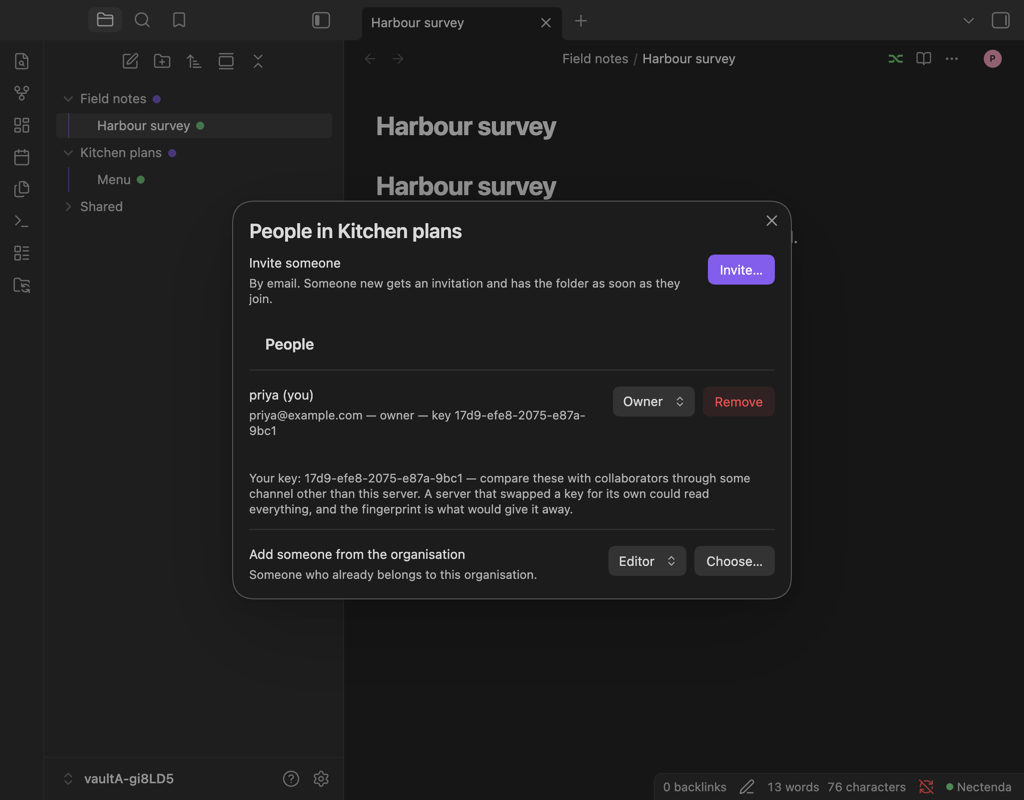
Check the result
Their line now says compared and the date, and the button has gone.
Troubleshooting
The fingerprints do not match
Do not mark it as compared. Remove them from the folder for now and contact us. A mismatch is exactly what this check exists to catch.
A notice says their key has changed
When a key you have shared with before changes, your vault stops: it does not share the folder with the new key, and the notice stays until you dismiss it. Their line in People in … says KEY CHANGED and shows the old fingerprint.
Compare the new fingerprint with them as above. If it matches what they read to you, choose Mark as compared, and sharing carries on. If they cannot explain why their key changed, treat it as a mismatch.
Do I have to do this?
Nothing stops you sharing without it. But until you compare, the encryption protects you from a server that reads your notes, not from one that actively tries to intercept them. See How the encryption works.